
React Best Practices Every Developer Has to Follow (Lessons From My Journey)

When I wrote my first React component, I treated it like “just another front-end library.” Years later, after building production apps in React, Vue, Angular, Laravel, Flutter, and more, I’ve come to see React as an ecosystem where discipline matters more than syntax.
In this article, I’ll walk through the React best practices every developer has to follow, not as theory, but as patterns I’ve learned (sometimes the hard way) while shipping real products: from e‑commerce and admin panels to mobile apps and notification libraries.
- Start With a Scalable Project & Folder Structure
One of the biggest early mistakes I made with React was letting the project structure “grow organically.” It always started fine and always ended as a mess.
Now, I start every React project with a scalable, predictable structure that supports growth from day one.
A pattern that has served me well is component‑centric structure:
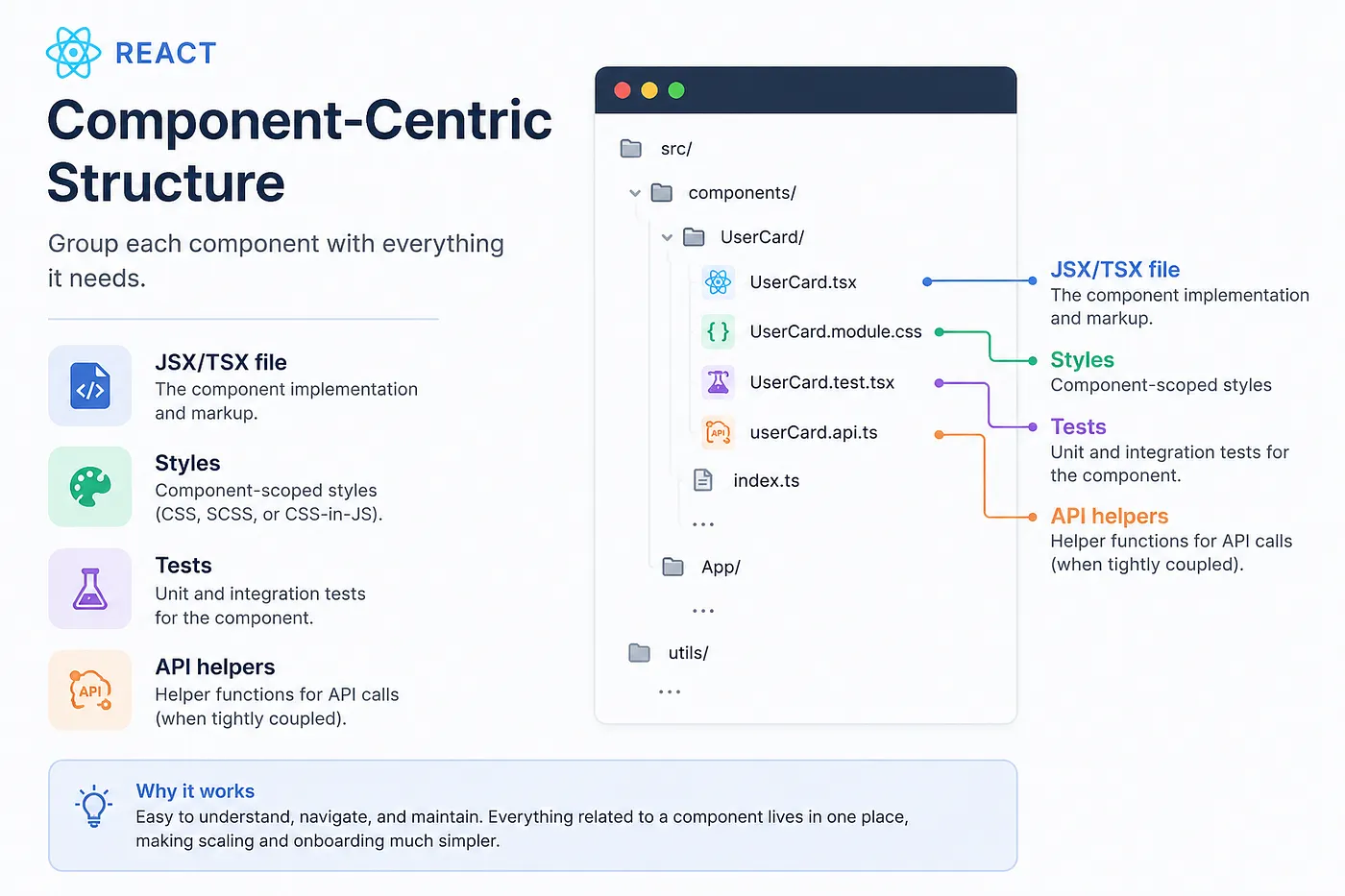
- Group each component with everything it needs:
- JSX/TSX file
- styles
- tests
- API helpers (if they’re tightly coupled)
For example:
- components/Login/Login.jsx
- components/Login/Login.scss
- components/Login/Login.test.js
- components/Login/LoginAPI.js
On some projects, especially larger ones, I invert the structure and group by type instead of feature:
components/– all UI components (Login, Profile, User)- apis/ – all API wrappers (LoginAPI, ProfileAPI, UserAPI)
Both approaches can work. The key is: pick one, document it, and stick to it. When teams don’t agree on structure, React projects decay quickly.
- Write Reusable Components and Respect DRY
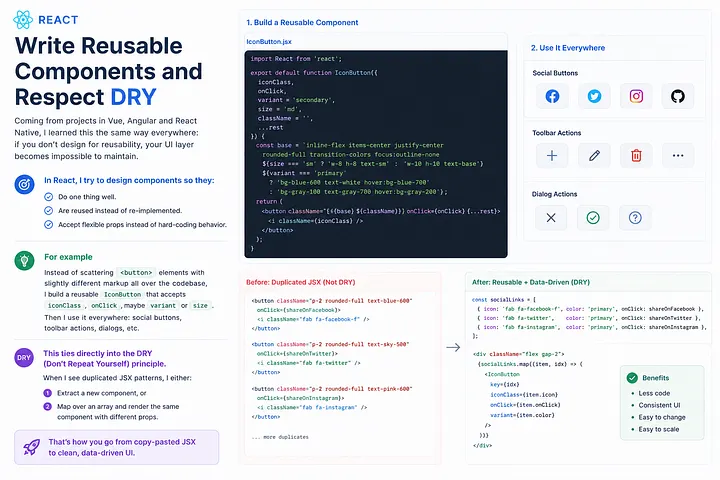
Coming from projects in Vue, Angular and React Native, I learned this the same way everywhere: if you don’t design for reusability, your UI layer becomes impossible to maintain.
In React, I try to design components so they:
- Do one thing well.
- Are reused instead of re‑implemented.
- Accept flexible props instead of hard‑coding behavior.
For example, instead of scattering <button> elements with slightly different markup all over the codebase, I build a reusable IconButton that accepts iconClass, onClick, maybe variant or size. Then I use it everywhere: social buttons, toolbar actions, dialogs, etc.
This ties directly into the DRY (Don’t Repeat Yourself) principle. When I see duplicated JSX patterns, I either:
- Extract a new component, or
- Map over an array and render the same component with different props.
That's how you go from copy‑pasted JSX to clean, data‑driven UI.
- Prefer Functional Components and Hooks Over Classes

I’ve built things with React classes, React Native, Vue, Angular, Laravel Blade, and more. Once Hooks became stable, I stopped reaching for class components unless a legacy codebase forced me to.
Why I strongly prefer functional components with Hooks:
- Cleaner, more concise syntax.
- Logic is easier to extract into custom hooks and reuse.
- No more juggling this, weird lifecycle methods, or huge class files.
For example, instead of:
class Foo extends React.Component {

  state = { someData: '' };
  componentDidMount() {
  // side effect
  }

  render() {
    return (
        <>
          <p>{this.state.someData}</p>
          <button
            onClick={() => this.setState({ someData: Math.random() })}>
          Go
          </button>
        </>
    );
  }
}
I reach for:
import { useState, useEffect } from 'react';

export function Foo() {
const [someData, setSomeData] = useState('');

  useEffect(() => {

    // side effect equivalent to componentDidMount / Update depending on deps

  }, []);

  return (
      <>
        <p>{someData}</p>
        <button
          onClick={() => setSomeData(Math.random())}>
        Go
        </button>
      </>
  );
}
Once your team leans into Hooks like useState, useEffect, and useContext (plus custom hooks), you naturally write code that’s easier to reason about and refactor.
- Separate State & Business Logic From UI
This is a principle I’ve carried across everything I build, whether it’s a MERN app, a Laravel + Livewire system, or a React front‑end.
In React, the smell is obvious: when a component has both:
- Manages complex state/business rules
- Renders a large, detailed UI tree
It becomes untestable and painful to maintain.
The fix is to split responsibilities:
- A stateful piece (often a custom hook or a container component) that:
- Fetches data
- Holds state
- Encapsulates domain logic
- A stateless UI component that:
- Receives props
- Renders markup
- Stays dumb on purpose
function useCustomLogic() {
const [value, setValue] = useState(null);

const handleClick = () => {
  // business logic
  setValue('updated');
};

return { value, handleClick };
}

function MyComponent() {
  const { value, handleClick } = useCustomLogic();
  return <Element value={value} onClick={handleClick} />;
}
This pattern makes it easy to test logic independently, reuse it elsewhere, and redesign the UI later without rewriting the business rules.
- Name Components Intentionally (PascalCase, Not VagueCase)
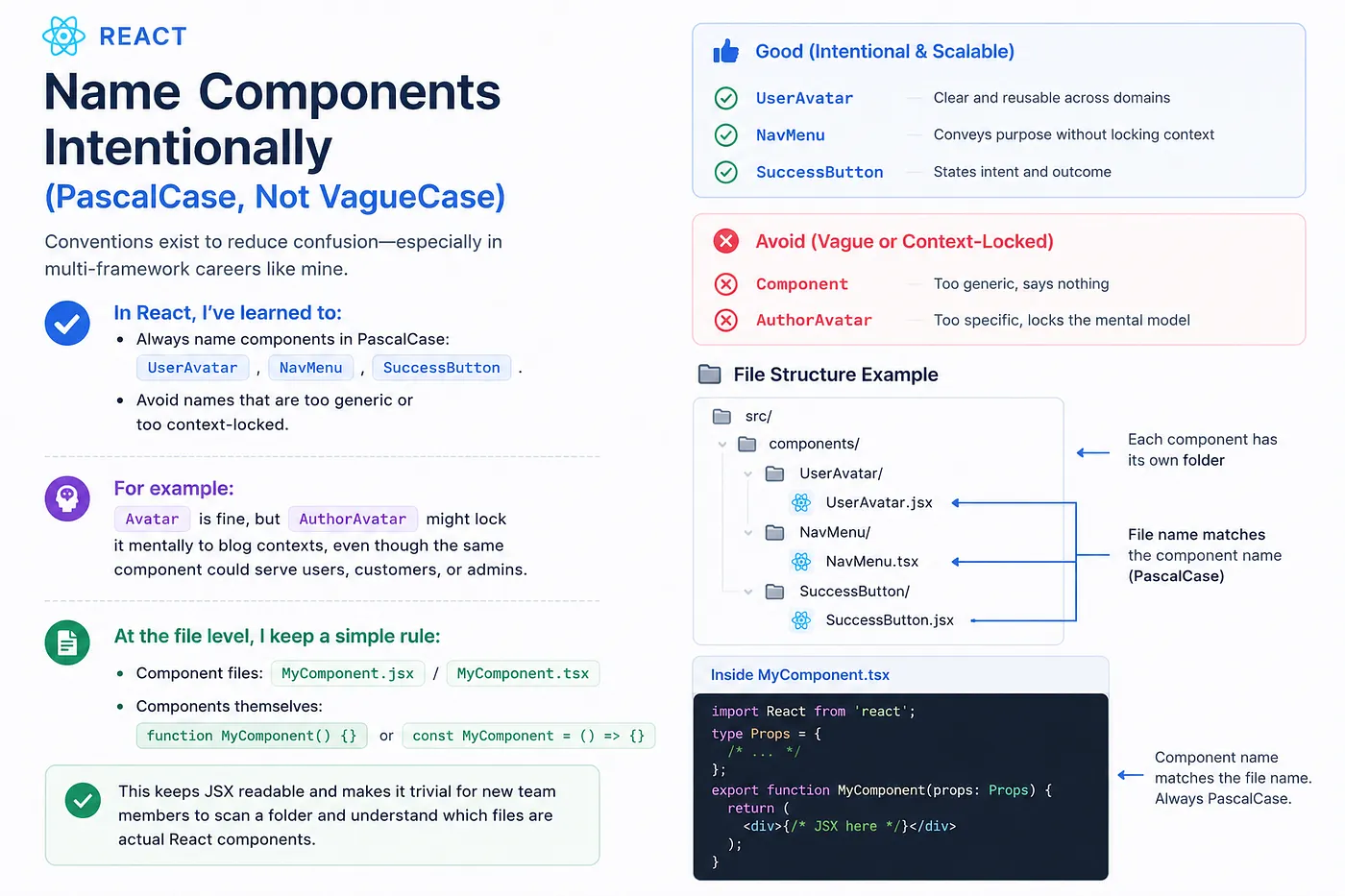
Conventions exist to reduce confusion — especially in multi‑framework careers like mine.
In React, I’ve learned to:
- Always name components in PascalCase:
UserAvatar,NavMenu,SuccessButton. - Avoid names that are too generic or too context‑locked.
For example, Avatar is fine, but AuthorAvatar might lock it mentally to blog contexts, even though the same component could serve users, customers, or admins.
At the file level, I keep a simple rule:
- Component files:
MyComponent.jsx/MyComponent.tsx - Components themselves:
function MyComponent() {}orconst MyComponent = () => {}
This keeps JSX readable and makes it trivial for new team members to scan a folder and understand which files are actual React components.
- Render Lists With map() and Meaningful Keys
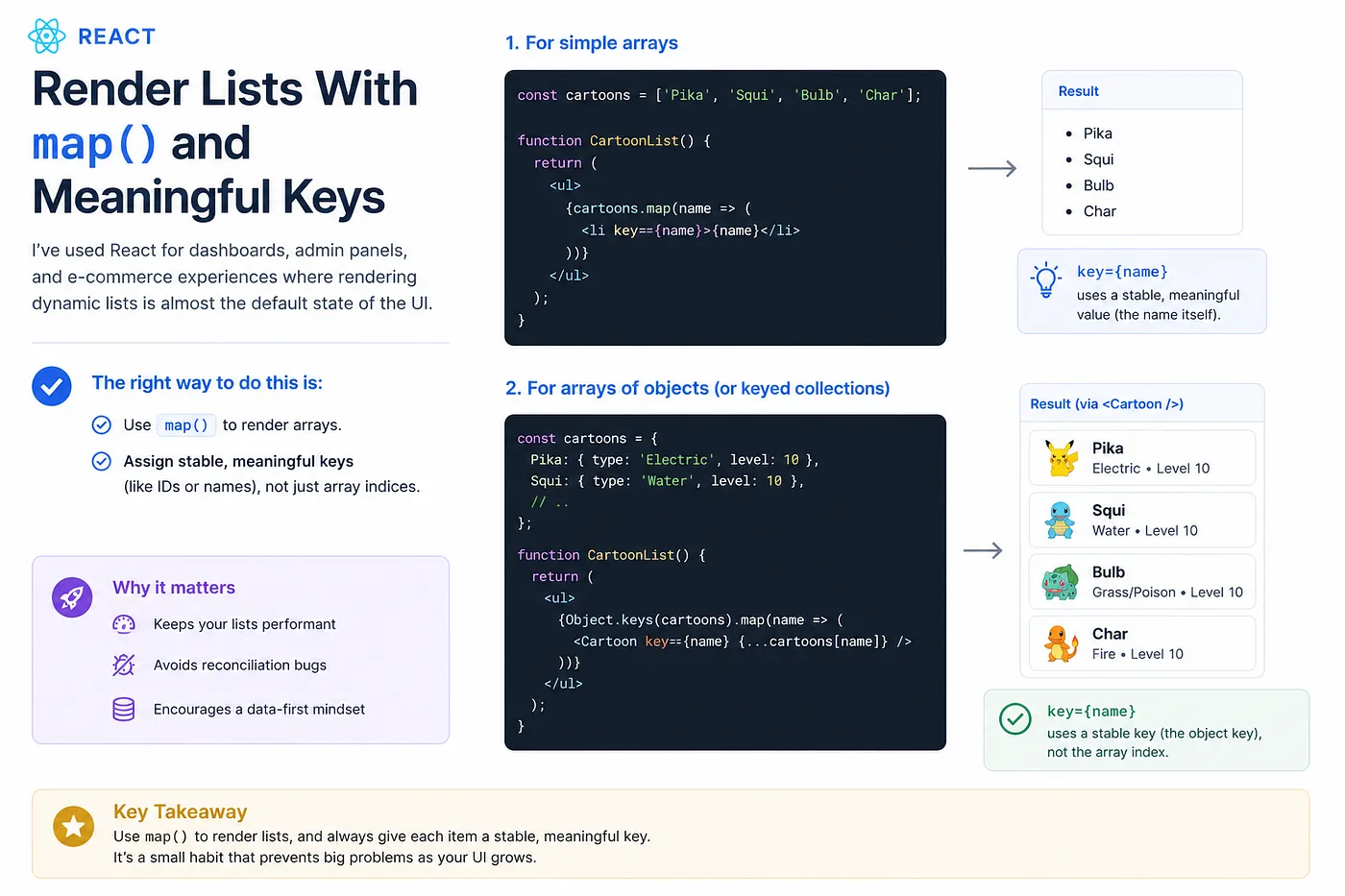
I've used React for dashboards, admin panels, and e‑commerce experiences where rendering dynamic lists is almost the default state of the UI.
The right way to do this is:
- Use map() to render arrays.
- Assign stable, meaningful keys (like IDs or names), not just array indices.
Example:
const cartoons = ['Pika', 'Squi', 'Bulb', 'Char'];

function CartoonList() {
  return (
    <ul>
    {cartoons.map(name => (
      <li key={name}>{name}</li>
    ))}
    </ul>
  );
}
For objects:
const cartoons = {
  Pika: { type: 'Electric', level: 10 },
  Squi: { type: 'Water', level: 10 },
  // …
};

function CartoonList() {
  return (
    <ul>
    {Object.keys(cartoons).map(name => (
      <Cartoon key={name} {…cartoons[name]} />
    ))}
    </ul>
  );
}
This keeps your lists performant, avoids reconciliation bugs, and encourages a data‑first mindset.
- Respect Security: XSS, Dangerous URLs, and Inner HTML
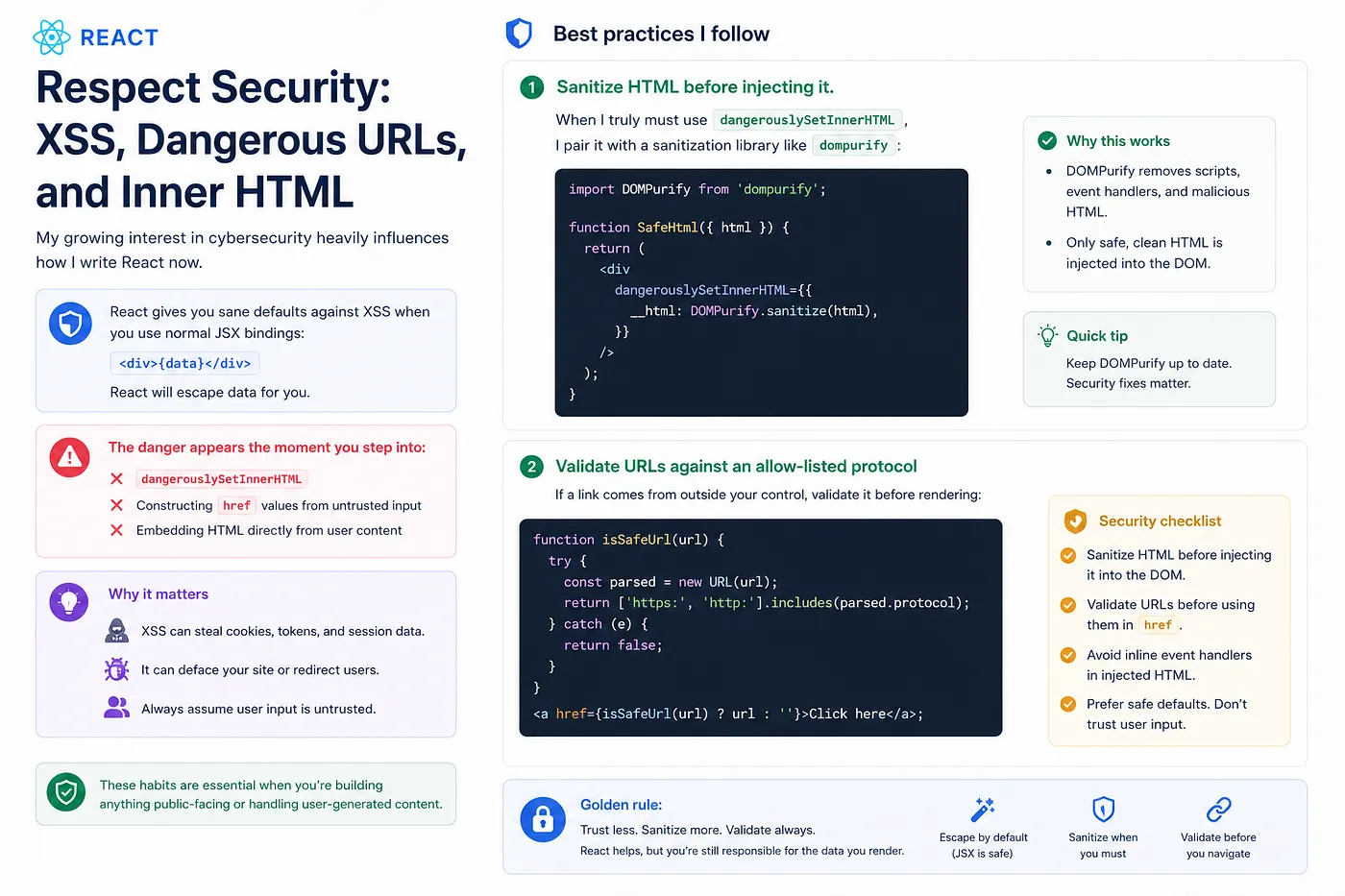
My growing interest in cybersecurity heavily influences how I write React now.
React gives you sane defaults against XSS when you use normal JSX bindings:
<div>{data}</div>
React will escape data for you. The danger appears the moment you step into:
- dangerouslySetInnerHTML
- Constructing href values from untrusted input
- Embedding HTML directly from user content
Best practices I follow:
- Sanitize HTML before injecting it.
When I truly must use
dangerouslySetInnerHTML, I pair it with a sanitization library likedompurify: import DOMPurify from 'dompurify';
function SafeHtml({ html }) {
  return (
    <div
      dangerouslySetInnerHTML={{
      __html: DOMPurify.sanitize(html),
      }}
    />
  );
}
- Validate URLs against an allow‑listed protocol If a link comes from outside your control, validate it before rendering:
function isSafeUrl(url) {

const parsed = new URL(url);

return ['https:', 'http:'].includes(parsed.protocol);
}

<a href={isSafeUrl(url) ? url : ''}>Click here</a>;
These habits are essential when you’re building anything public‑facing or handling user‑generated content.
- Use the Right Tools: Snippets, Bit, and Testing From Day One
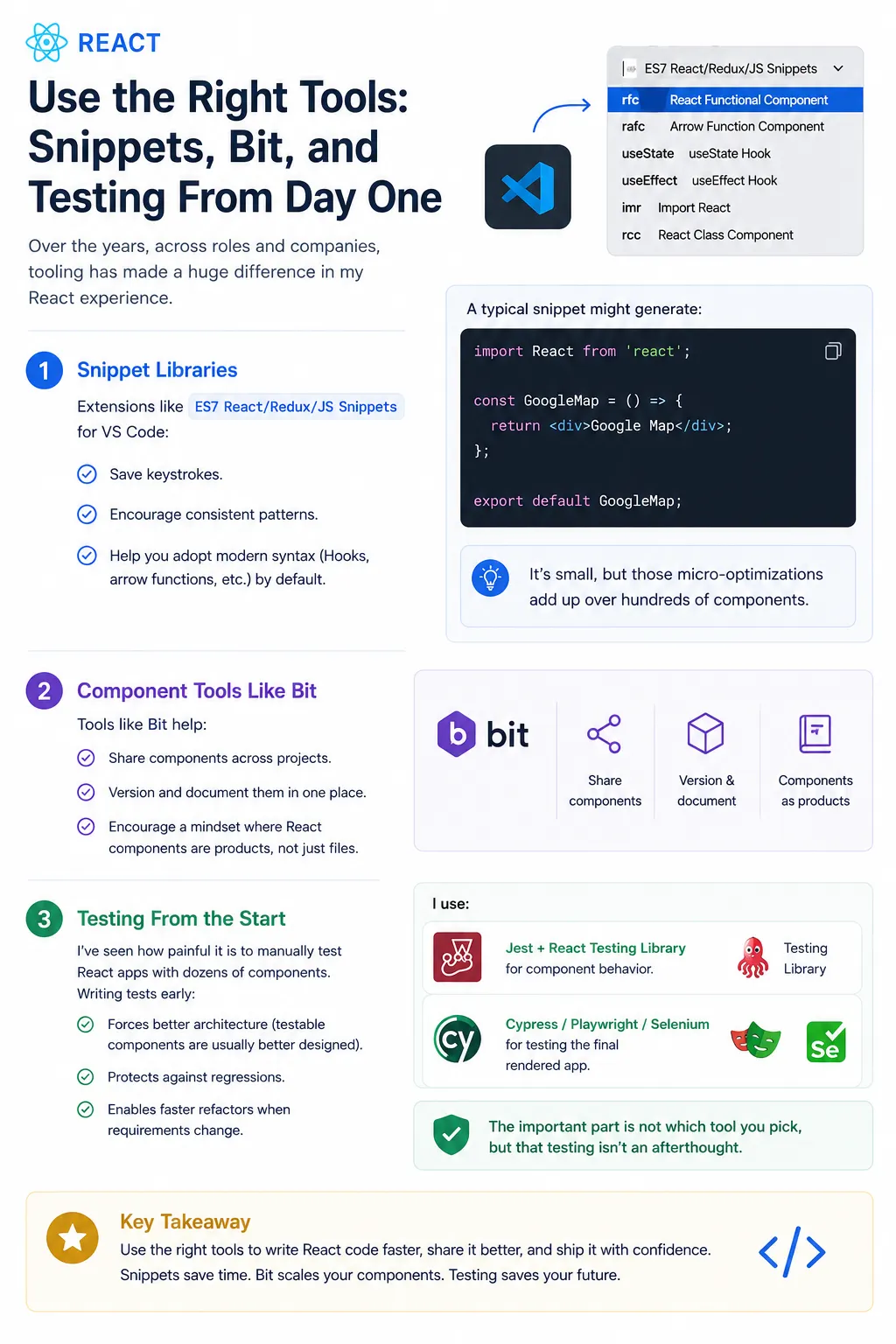
Over the years, across roles and companies, tooling has made a huge difference in my React experience.
A few practices that consistently pay off:
Snippet Libraries
Extensions like ES7 React/Redux/JS Snippets for VS Code:
- Save keystrokes.
- Encourage consistent patterns.
- Help you adopt modern syntax (Hooks, arrow functions, etc.) by default.
A typical snippet might generate:
import React from 'react';

const GoogleMap = () => {
  return <div>Google Map</div>;
};

export default GoogleMap;
It's small, but those micro‑optimizations add up over hundreds of components.
Component Tools Like Bit
Tools like Bit help:
- Share components across projects.
- Version and document them in one place.
- Encourage a mindset where React components are products, not just files.
Testing From the Start
I've seen how painful it is to manually test React apps with dozens of components. Writing tests early:
- Forces better architecture (testable components are usually better designed).
- Protects against regressions.
- Enables faster refactors when requirements change.
I use:
- Jest and React Testing Library for component behavior.
- Cross‑browser or E2E tools for testing the final rendered app.
The important part is not which tool you pick, but that testing isn’t an afterthought.
- Keep State Business Logic Separate From HTTP & Auth Concerns

On the backend, I’ve worked with JWT auth, MongoDB, Redis, and stock management systems; on the frontend, I treat React as the last layer that consumes well‑designed APIs.
Best practices I carry into React:
- Keep authentication logic (tokens, refresh, expiration) in:
- A central service, or
- A dedicated context/custom hook.
- Don’t let every component handle low‑level HTTP details.
- Use a consistent client (like Axios or fetch wrappers) with interceptors for:
- Attaching tokens
- Handling 401/403
- Retrying when needed
This keeps React components focused on what to display, not how to talk to the server.
- Comment With Intention, Not Noise
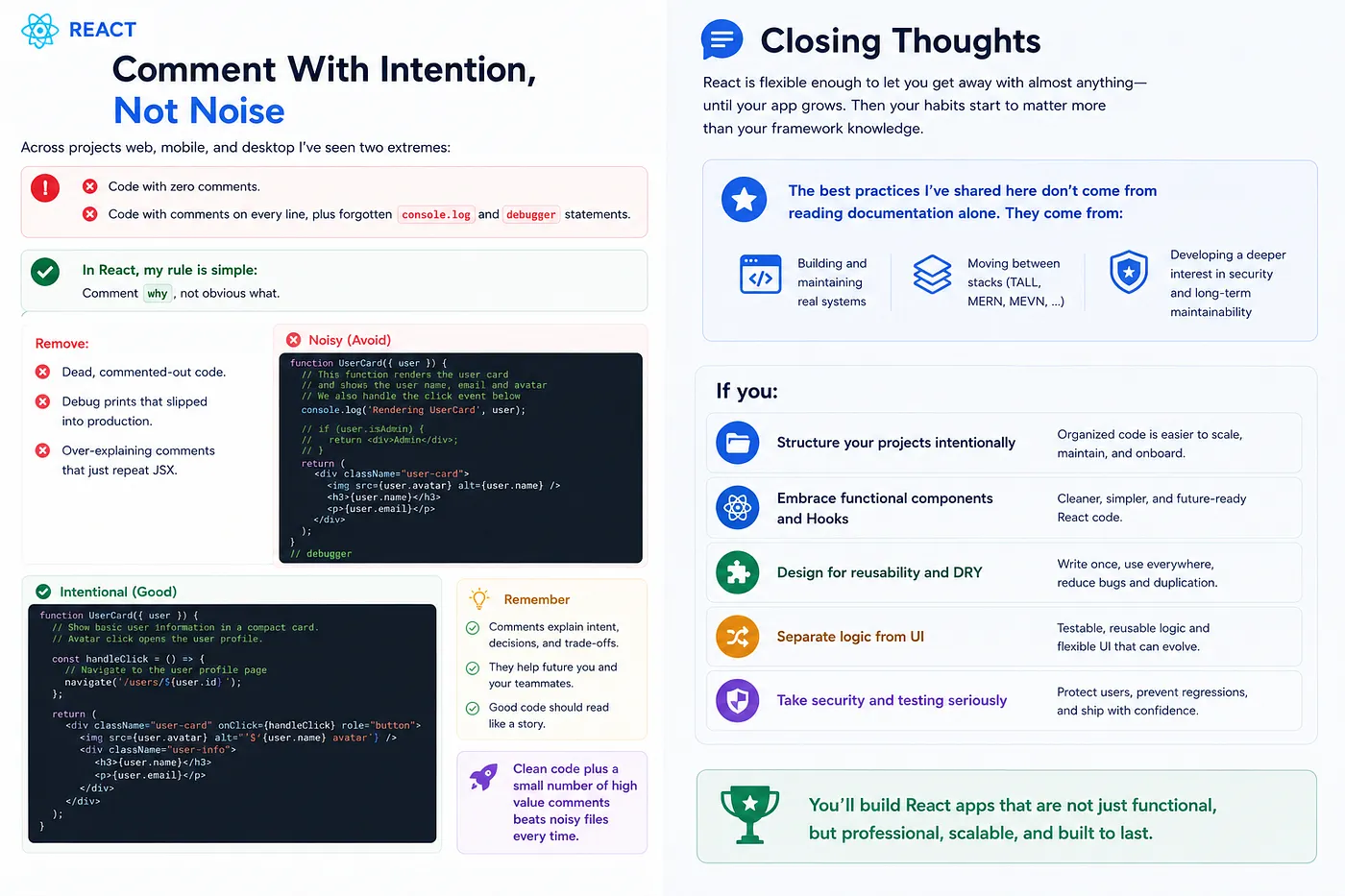
Across projects web, mobile, and desktop I’ve seen two extremes.
- Code with zero comments.
- Code with comments on every line, plus forgotten
console.loganddebuggerstatements.
In React, my rule is simple:
- Comment why, not obvious what.
- Remove:
- Dead, commented‑out code.
- Debug prints that slipped into production.
- Over‑explaining comments that just repeat JSX.
Clean code plus a small number of high value comments beats noisy files every time.
Closing Thoughts
React is flexible enough to let you get away with almost anything — until your app grows. Then your habits start to matter more than your framework knowledge.
The best practices I’ve shared here don’t come from reading documentation alone. They come from:
- Building and maintaining real systems
- Moving between stacks (TALL, MERN, MEVN)
- Developing a deeper interest in security and long‑term maintainability
If you:
- Structure your projects intentionally,
- Embrace functional components and Hooks,
- Design for reusability and DRY,
- Separate logic from UI,
- Take security and testing seriously,
You'll find that React scales with you, not against you.
These are the React best practices every developer has to follow if they want to build applications that not only work today, but are still understandable and secure years from now.
Follow me on GitHub: MadhushaPrasad